When starting a PCB project with the Unisoft software, the first two steps are to import the CAD data, followed by the matching Bill of Materials (BOM) file. Below we will outline these two steps in brief. A table of the CAD file types supported is also provided below.
Developed over 40 years, ProntoCAD-CONNECT is the importer engine featured in all Unisoft software modules and allows the quick import of the two steps, CAD and BOM. Virtually any format of data used in PCB manufacturing can be imported, such as CAD, XY Center Rotation, Gerber, Bill of Materials (BOM), CNC, and mechanical drawing formats that EMS/CEM and OEM electronic manufacturers encounter. The time it normally takes to import the CAD and BOM files is less than 60 seconds.
VIDEO: Click the video above CAD importing overview.
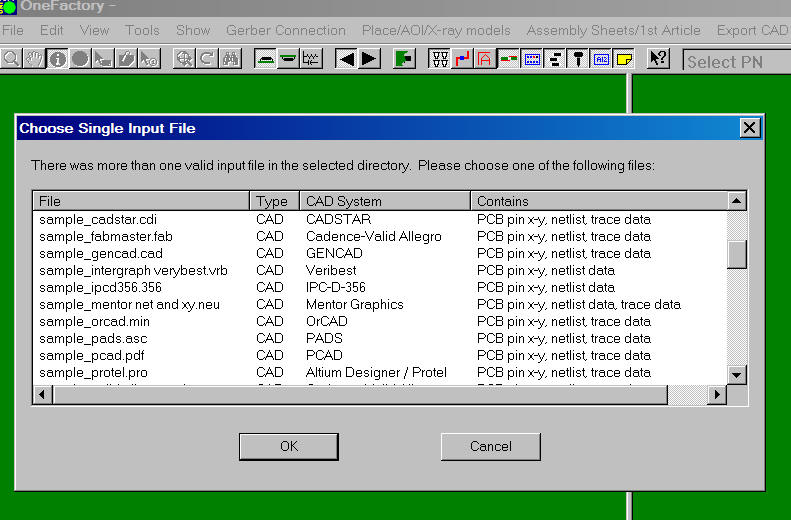
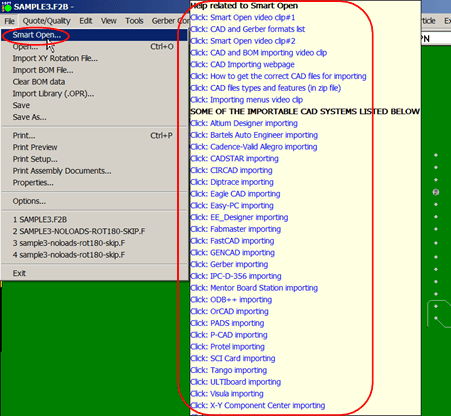
Importing your CAD files is easy with the Unisoft software! The "SMART OPEN" feature is your CAD expert that does all the work of finding and sorting out all the proper files in your project folder! Click here for a list of the CAD, Gerber, XY Rotation formats supported.
The SMART OPEN feature will scan all files for your project and will
automatically detect the CAD, Gerber, or XY rotation files that have the correct
content for importing into the Unisoft software. For example, if you have a
folder containing 30 assorted CAD, Gerber, BOM, and drawing files for a PC Board
project, the SMART OPEN feature will present you with only the correct CAD files
that can be imported, with the most desirable files at the top of the list.
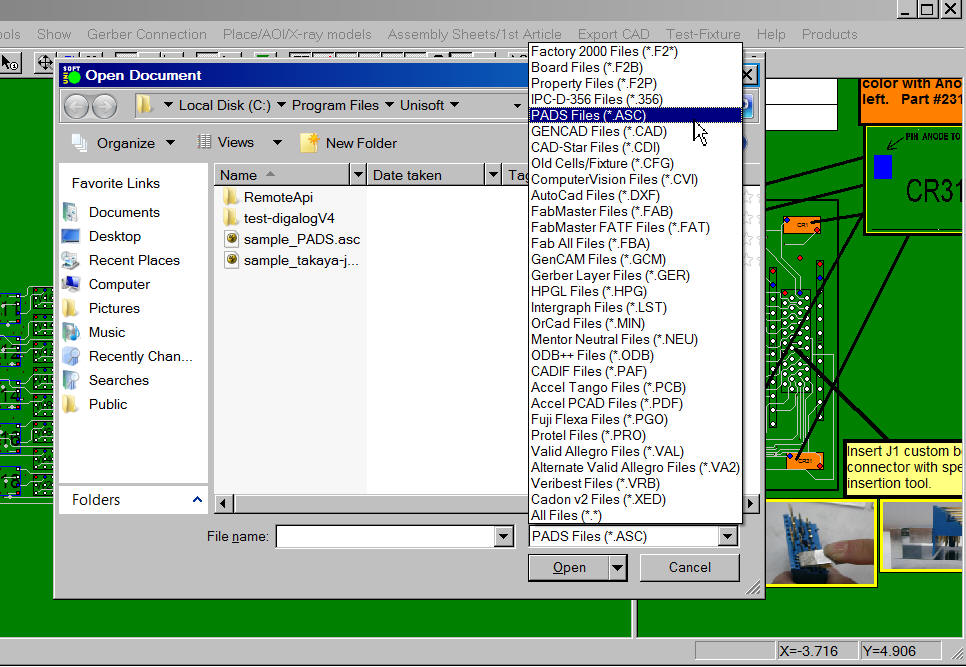
TO USE "SMART OPEN": From the Unisoft software, click FILE from the main menu, click SMART OPEN and a new window opens. In the new window, browse to and select the directory that your project CAD or Gerber files are located in. A new window opens; select one of the files presented, and your PC Board will be displayed.
Note: Unisoft imports the ASCII text files created by CAD systems and
supports revision levels dating back over 40 years, and this can be important
because older versions of CAD systems may still be in use on legacy PCB designs
and need to be supported . For example, the PADS ASCII CAD output .ASC file
format dates back to the 1980's and Unisoft supports virtually all the
variations of PADS created through the years within that format.
The Unisoft software can import virtually any Bill Of Materials (BOM) file
format. The BOM file contains the component parts, etc. information that
is used to assemble a PCB assembly project. BOM files come in many formats
styles.
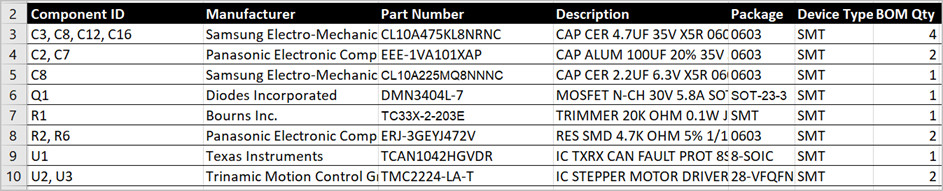
The Unisoft software imports the BOM data and then it is fixed to each component reference
designator on the PCB that was imported from the "Importing CAD File" step above.

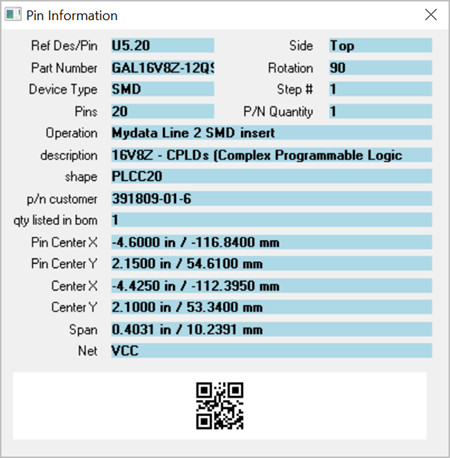
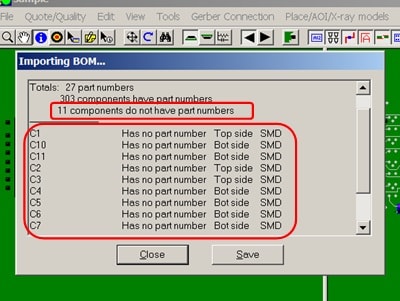
The Unisoft software does the extensive critical
cross-checking of the BOM
when it is imported, so errors are detected upfront.
Click here for more BOM Importing information.
The Unisoft SMART OPEN feature will find the best files to import to use on your PCB project automatically. However, if when using the SMART OPEN feature you are having trouble finding the right type of CAD file to import because it was not supplied with your PCB project files, the information in the table below will help you find the best data files for importing to the Unisoft software. Then you can request those files to continue your PCB project.
Note there are many other options with the Unisoft software if the ideal file is not available with your PCB project. For example, the Unisoft software can work with only the raw Gerber bare board files or the XY Center Rotation files that are normally available with most projects. Contact us for details and help to find the correct CAD file.
If needed, you can use this table below to match up the correct CAD
file required to be imported.
After you have installed the
Unisoft software, full samples of most of the CAD formats listed in the
table below can be found by default in the directory c:\program files (x86)\unisoft\cad-import-file-samples-etc . In that directory,
the sample files start with SAMPLE_ and the CAD
System is in the name of the file, for example, SAMPLE_PADS.ASC
is a full sample of the PADS CAD system ASCII file.
If you are
having trouble finding the right type of CAD file, then use these samples to
match them to the CAD files your CAD department or your clients may have
available for processing with the Unisoft software. For example, if
your company or client uses the Eagle CAD System, then two good file formats
listed in the table below for Eagle CAD are IPC-D-356 and GENCAD, and either
of these two files should produce a good result to complete your PCB
project. And samples of both these CAD files can be found in the
directory c:\program files (x86)\unisoft\cad-import-file-samples-etc and you may wish to
forward these files to whomever needs to create the correct files for your
project.
In the table below there are Note #'s
and reference those Note #'s below the table for more details on the CAD,
etc. system.
NATIVE CAD FILES: The native CAD files are unique files exported by a particular CAD vendor, for example Mentor Graphics or Orcad, and these file formats are distinct to that CAD company. Unisoft can import virtually all of these types of files.
STANDARD CAD FILES: Note that many CAD systems in addition to exporting their native format may export industry standard CAD formats such as GENCAD, GENCAM, FABMASTER, IPC-D-356, IPC-2581, etc. In most cases these files can be used in place of the native CAD files and are importable into the Unisoft software.
GERBER FILES: When CAD files are not available then Gerber files are often the only files available to Contract Manufacturers and OEM's. The Unisoft software can quickly translate these files into your required manufacturing files (see note 2 below).
X/Y CENTER & ROTATION FILES: When CAD files are not available then X/Y center & rotation files are often the only files available to Contract Manufacturers and OEM's. The Unisoft software can quickly translate these files into your required manufacturing files (see note 7 below).
| CAD system or standards file | File label or type | Standard extension | Contains this type of data / rotation type | Sample |
|---|---|---|---|---|
| Accel P-CAD (see note 12 below) | PDIF | .pdf (see note 12) | PCB assembly pin x-y,netlist,trace (see note 12 / 1b) | y |
| Accel P-CAD (see note 18) | IPC-D-356 | .ipc/.356/varies (see note 18) | PCB assembly pin x-y,netlist (see note 18 / 1a) | y |
| Accel P-CAD (see note 13) | ASCII output | .PCB (see note 13) | PCB assembly pin x-y,netlist,trace (see note 13 / 1a) | y |
| Accel P-CAD (see note 2) | Gerber | varies (see note 2) | PCB assembly drawing file (see note 2 / 1a) | y |
| Altium Designer (see note 5) | Protel output | .pro (see note 5) | PCB assembly pin x-y,netlist,trace (see note 5 / 1a) | y |
| Altium Designer (see note 21) | ODB++ | varies | PCB assembly pin x-y,netlist,trace (see note 21 / 1b) | y |
| Altium Designer (see note 22) | IPC-2581 | .cvg | PCB assembly pin x-y,netlist,trace (see note 22 / 1b) | y |
| Altium Designer (see note 5) | pin x-y list | .PCB (see note 5) | PCB assembly pin x-y,netlist,trace (see note 5 / 1a) | y |
| Altium Designer (see note 5) | Data | .PCBdoc (see note 5) | PCB assembly pin x-y,netlist,trace (see note 5 / 1a) | n |
| Altium Designer (see note 2) | Gerber | varies (see note 2) | PCB assembly drawing file (see note 2 / 1a) | y |
| AutoCAD (see note 20) | Design Exchange | .dxf (see note 20) | drawing file (see note 20) | y |
| Autodesk Eagle (see Eagle PCB) | (see Eagle PCB) | (see Eagle PCB) | (see Eagle PCB) | - |
| AutoCAD Electrical (see note 31) | x-y centroid | varies (see note 31) | PCB assembly x-y center (see note 31) | y |
| AutoTRAX DEX (see note 19) | (see note 19) | (see note 19) | (see note 19) | n |
| AutoTRAX DEX (see note 2) | Gerber | varies (see note 2) | PCB assembly drawing file (see note 2 / 1a) | y |
| Bartels Auto Engineer (see note 18) | IPC-D-356 | .ipc/.356/varies (see note 18) | PCB assembly pin x-y,netlist (see note 18 / 1a) | y |
| Bartels Auto Engineer | GENCAD | .cad | PCB assembly pin x-y,netlist,trace (see note 1b) | y |
| Bartels Auto Engineer (see note 2) | Gerber | varies (see note 2) | PCB assembly drawing file (see note 2 / 1a) | y |
| Cadence-Valid Allegro (see note 3) | pin x-y list | varies (see note 3) | PCB assembly pin x-y,netlist,trace (see note 3 / 1b) | y |
| Cadence-Valid Allegro (see note 3) | IPC-D-356 | .ipc/.356 (see note 3) | PCB assembly pin x-y,netlist (see note 3 / 1a) | y |
| Cadence-Valid Allegro (see note 2) | Gerber | varies (see note 2) | PCB assembly drawing file (see note 2 / 1a) | y |
| CADint | GENCAD | .cad | PCB assembly pin x-y,netlist,trace (see note 1b) | y |
| CADint (see note 18) | IPC-D-356 | .ipc/.356/varies (see note 18) | PCB assembly pin x-y,netlist (see note 18 / 1a) | y |
| CADint (see note 26) | pin x-y list | .fat/.fatf - FATF file (see note 26) | PCB assembly pin x-y,netlist,trace (see note 26 / 1b) | y |
| CADint (see note 2) | Gerber | varies (see note 2) | PCB assembly drawing file (see note 2 / 1a) | y |
| CADSTAR (see note 17) | CADIF | .paf (see note 17) | PCB assembly pin x-y,netlist,trace (see note 1a) | y |
| CADSTAR | pin x-y list | .cdi | PCB assembly pin x-y,netlist,trace (see note 1b) | y |
| CADSTAR (see note 2) | Gerber | varies (see note 2) | PCB assembly drawing file (see note 2 / 1a) | y |
| CIRCAD | GENCAD | .cad | PCB assembly pin x-y,netlist,trace (see note 1b) | y |
| CIRCAD (see note 4) | IPC-D-356 | .ipc/.356 (see note 4) | PCB assembly pin x-y,netlist (see note 4 / 1a) | y |
| CIRCAD (see note 2) | Gerber | varies (see note 2) | PCB assembly drawing file (see note 2 / 1a) | y |
| ComputerVision | pin x-y list | .cvi | PCB assembly pin x-y,netlist,trace | n |
| ComputerVision (see note 2) | Gerber | varies (see note 2) | PCB assembly drawing file (see note 2 / 1a) | y |
| Copper Connection (see note 2) | Gerber | varies (see note 2) | PCB assembly drawing file (see note 2 / 1a) | y |
| CR5000 (see note 17) | CADIF | .paf (see note 17) | PCB assembly pin x-y,netlist,trace (see note 17 / 1a) | y |
| CR5000 (see note 6) | ODB++ | varies (see note 6) | PCB assembly pin x-y,netlist,trace (see note 6 / 1b) | y |
| CR5000 (see note 2) | Gerber | varies (see note 2) | PCB assembly drawing file (see note 2 / 1a) | y |
| CR8000 (see note 17) | CADIF | .paf (see note 17) | PCB assembly pin x-y,netlist,trace (see note 17 / 1a) | y |
| CR8000 (see note 6) | ODB++ | varies (see note 6) | PCB assembly pin x-y,netlist,trace (see note 6 / 1b) | y |
| CR8000 (see note 2) | Gerber | varies (see note 2) | PCB assembly drawing file (see note 2 / 1a) | y |
| DesignSpark (see note 27) | ODB++ | varies (see note 27) | PCB assembly pin x-y,netlist,trace (see note 6 / 1b) | y |
| DesignSpark (see note 2) | Gerber | varies (see note 2) | PCB assembly drawing file (see note 2 / 1a) | y |
| Diptrace (see note 18) | IPC-D-356 | .ipc/.356 | PCB assembly pin x-y,netlist,trace (see note 6 / 1b) | y |
| Diptrace | ODB++ | varies (see note 6) | PCB assembly pin x-y,netlist,trace | y |
| Diptrace | PADS type ASCII | .asc | PCB assembly pin x-y,netlist,trace (see note 1a) | y |
| Diptrace | PCAD PCB | .PCB | PCB assembly pin x-y,netlist,trace | y |
| Diptrace | Min OrCAD file | .min | PCB assembly pin x-y,netlist,trace (see note 1a) | y |
| Diptrace (see note 7) | x-y centroid | varies (see note 7) | PCB assembly x-y center (see note 7) | y |
| Diptrace (see note 2) | Gerber | varies (see note 2) | PCB assembly drawing file (see note 2 / 1a) | y |
| Douglas CAD/CAM Pro (see note 7) | x-y centroid | varies (see note 7) | PCB assembly x-y center (see note 7) | y |
| Douglas CAD/CAM Pro (see note 2) | Gerber | varies (see note 2) | PCB assembly drawing file (see note 2 / 1a) | y |
| Draftview (see note 23) | drawing file | varies (see note 23) | drawing file | y |
| Draftware (see note 23) | drawing file | varies (see note 23) | drawing file | y |
| Eagle PCB assembly(see note 4) | IPC-D-356 | .ipc/.356 (see note 4) | PCB assembly pin x-y,netlist (see note 4 / 1a) | y |
| Eagle PCB assembly(see note 4) | GENCAD | .cad (see note 4) | PCB assembly pin x-y,netlist,trace (see note 4 / 1b) | y |
| Eagle PCB assembly(see note 4) | pin x-y list | .fatf - FATF file (see note 4) | PCB assembly pin x-y,netlist,trace (see note 4 / 1b) | y |
| Eagle PCB assembly(see note 4) | other | scripts (see note 4) | PCB assembly exports using scripts (see note 4) | y |
| Eagle PCB assembly(see note 2) | Gerber | varies (see note 2) | PCB assembly drawing file (see note 2 / 1a) | y |
| Easy-PC (see note 24) | IPC-2581 | .cvg | PCB assembly pin x-y,netlist,trace (see note 24 / 1b) | y |
| Easy-PC (see note 32) | ODB++ | varies (see note 32) | PCB assembly pin x-y,netlist,trace (see note 32 / 1b) | y |
| Easy-PC (see note 7) | x-y centroid | varies (see note 7) | PCB assembly x-y center (see note 7) | y |
| Easy-PC (see note 2) | Gerber | varies (see note 2) | PCB assembly drawing file (see note 2 / 1a) | y |
| Easy-PC (see note 8 - optional export) | GENCAD | cad (see note 8) | PCB assembly pin x-y,netlist,trace (see note 8 / 1b) | y |
| EasyEDA | PADS-PCB | .asc | PCB assembly pin x-y,netlist,trace (see note 1a) | y |
| EasyEDA | Protel output | .pro | PCB assembly pin x-y,netlist,trace (see note 1a) | y |
| EasyEDA | x-y centroid | varies (see note 7) | PCB assembly x-y center (see note 7) | y |
| EasyEDA | Gerber | varies (see note 2) | PCB assembly drawing file (see note 2 / 1a) | y |
| EE Designer | ASCII output | .ala | PCB assembly Ascii | n |
| EE Designer (see note 2) | Gerber | varies (see note 2) | PCB assembly drawing file (see note 2 / 1a) | y |
| Fabmaster (see note 26) | pin x-y list | .fatf - FATF file (see note 26) | PCB assembly pin x-y,netlist,trace (see note 26 / 1b) | y |
| Fabmaster | pin x-y list | varies | PCB assembly pin x-y,netlist,trace (see note 1b) | y |
| Fabmaster (see note 2) | Gerber | varies (see note 2) | PCB assembly drawing file (see note 2 / 1a) | y |
| FastCAD (see note 2) | Gerber | varies (see note 2) | PCB assembly drawing file (see note 2 / 1a) | y |
| FreePCB (see note 34) | x-y centroid | varies (see note 34) | PCB assembly x-y center (see note 34) | y |
| FreePCB | PADS-PCB | .asc | PCB assembly netlist (pin x-y?, trace?) | y |
| FreePCB | PDIF | .pdf (see note 12) | PCB assembly pin x-y,netlist,trace (see note 6/1b) | y |
| FreePCB (see note 2) | Gerber | varies (see note 2) | PCB assembly drawing file (see note 2 / 1a) | y |
| Fuji PCB assembly file | Flexa .pgo | .pgo | PCB assembly x-y center | y |
| GENA PxxxPCB assembly (see note 7) | x-y centroid | varies (see note 7) | PCB assembly x-y center (see note 7) | y |
| GENA PxxxPCB assembly (see note 2) | Gerber | varies (see note 2) | PCB assembly drawing file (see note 2 / 1a) | y |
| GENCAD | GENCAD | .cad | PCB assembly pin x-y,netlist,trace (see note 1b) | y |
| GENCAM | GENCAM | .gcm | PCB assembly pin x-y,netlist,trace | y |
| Gerber (see note 2) | Gerber | varies (see note 2) | PCB assembly drawing file (see note 2 / 1a) | y |
| HPGL (see note 23) | Internet | .hpg | drawing file | y |
| Incases | TL CAD | .tl | PCB assembly Ascii | n |
| Incases (see note 2) | Gerber | varies (see note 2) | PCB assembly drawing file (see note 2 / 1a) | y |
| Intergraph | pin x-y list | .lst | PCB assembly pin x-y,netlist,trace | y |
| Intergraph (see note 2) | Gerber | varies (see note 2) | PCB assembly drawing file (see note 2 / 1a) | y |
| IPC-2581 (see note 24) | IPC-2581 | .cvg (see note 24) | PCB assembly pin x-y,netlist,trace (see note 24 / 1b) | y |
| IPC-2581A(xml) (see note 25) | IPC-2581A | .xml (see note 25) | PCB assembly pin x-y,netlist,trace (see note 25 / 1b) | y |
| IPC-D-356 (see note 18) | IPC-D-356 | varies (see note 18) | PCB assembly pin x-y,netlist (see note 18 / 1a) | y |
| Keysight ADS (see note 7) | x-y centroid | varies (see note 7) | PCB assembly x-y center (see note 7) | y |
| Keysight ADS (see note 2) | Gerber | varies (see note 2) | PCB assembly drawing file (see note 2 / 1a) | y |
| KiCAD | GENCAD | cad | PCB assembly pin x-y,netlist,trace (see note 1b) | y |
| KiCAD (see note 7) | x-y centroid | varies (see note 7) | PCB assembly x-y center (see note 7) | y |
| KiCAD (see note 2b) | Gerber | varies (see note 2b) | PCB assembly drawing file (see note 2b / 1a) | y |
| McCAD (see note 18) | IPC-D-356 | .ipc/.356 | PCB assembly pin x-y,netlist (see note 1a) | y |
| McCAD | GENCAD | .cad | PCB assembly pin x-y,netlist,trace (see note 1b) | y |
| McCAD | pin x-y list | .tbs | PCB assembly pin x-y,netlist,trace | n |
| McCAD (see note 2) | Gerber | varies (see note 2) | PCB assembly drawing file (see note 2 / 1a) | y |
| MentorBoardStation (see note 29) | Mentor Neutral pin x-y | .neu/varies | PCB assembly pin x-y,netlist (see note 1a) | y |
| MentorBoardStation | Mentor Route (traces) | .txt/varies | PCB assembly trace | y |
| MentorBoardStation (see note 6) | ODB++ | varies (see note 6) | PCB assembly pin x-y,netlist,trace (see note 6 / 1b) | y |
| MentorBoardStation (see note 2) | Gerber | varies (see note 2) | PCB assembly drawing file (see note 2 / 1a) | y |
| Mentor Expedition (see note 9) | GENCAD | .cad (see note 9) | PCB assembly pin x-y,netlist,trace (see note 9 / 1b) | y |
| Mentor Expedition (see note 9) | IPC-D-356 | .ipc/.356 (see note 9) | PCB assembly pin x-y,netlist (see note 9 / 1a) | y |
| Mentor Expedition (see notes 6, 9) | ODB++ | varies (see notes 6, 9) | PCB assembly pin x-y,netlist,trace (see notes 6, 9 / 1b) | y |
| Mentor Expedition (see note 2) | Gerber | varies (see note 2) | PCB assembly drawing file (see note 2 / 1a) | y |
| ODB++ (see note 6) | ODB++ | varies (see note 6) | PCB assembly pin x-y,netlist,trace (see note 6 / 1b) | y |
| ODB++ (see note 6b) | X-Y center rotation | X-Y center rotation (see note 6b) | PCB assembly X-Y component centers (see note 6b) | y |
| OrCAD PCB assemblyDesigner (see note 30) | GENCAD | .cad | PCB assembly pin x-y,netlist,trace (see note 1b) | y |
| OrCAD PCB assemblyDesigner (see note 6) | ODB++ | varies (see note 6) | PCB assembly pin x-y,netlist,trace (see note 6 / 1b) | y |
| OrCAD PCB assemblyDesigner (see note 28) | IPC-2581 | .cvg | PCB assembly pin x-y,netlist,trace (see note 22 / 1b) | y |
| OrCAD PCB assemblyDesigner (see note 2) | Gerber | varies (see note 2) | PCB assembly drawing file (see note 2 / 1a) | y |
| OrCAD Masstek | Min file | .min | PCB assembly pin x-y,netlist,trace (see note 1b) | y |
| OrCAD Masstek | GENCAD | .cad | PCB assembly pin x-y,netlist,trace (see note 1b) | y |
| OrCAD Masstek (see note 18) | IPC-D-356 | .ipc/.356/varies (see note 18) | PCB assembly pin x-y,netlist (see note 18 / 1a) | y |
| OrCAD Masstek (see note 2) | Gerber | varies (see note 2) | PCB assembly drawing file (see note 2 / 1a) | y |
| OrCAD 386+ (see note 7) | x-y centroid | varies (see note 7) | PCB assembly x-y center (see note 7) | y |
| OrCAD 386+ (see note 2) | Gerber | varies (see note 2) | PCB assembly drawing file (see note 2 / 1a) | y |
| PADS (see note 11) | ASCII output | .asc (see note 11) | PCB assembly pin x-y,netlist,trace (see note 11 / 1a) | y |
| PADS (see note 6) | ODB++ | varies (see note 6) | PCB assembly pin x-y,netlist,trace (see note 6 / 1b) | y |
| PADS (see note 2) | Gerber | varies (see note 2) | PCB assembly drawing file (see note 2 / 1a) | y |
| Panasonic PCB assembly file | Panasonic .crb | .crb | PCB assembly x-y center | n |
| Pantheon/Intercept | GENCAD | .cad | PCB assembly pin x-y,netlist,trace (see note 1b) | y |
| Pantheon/Intercept (see note 2) | Gerber | varies (see note 2) | PCB assembly drawing file (see note 2 / 1a) | y |
| Pantheon/Intercept (see note 18) | IPC-D-356 | .ipc/.356/varies (see note 18) | PCB assembly pin x-y,netlist (see note 18 / 1a) | y |
| Pantheon/Intercept | Mentor | .neu | PCB assembly pin x-y,netlist (see note 1a) | y |
| Pantheon/Intercept (see note 6) | ODB++ | varies (see note 6) | PCB assembly pin x-y,netlist,trace (see note 6 / 1b) | y |
| Pantheon/Intercept | Visual | varies | PCB assembly pin x-y,netlist,trace | y |
| P-CAD (see note 12) | PDIF | .pdf (see note 12) | PCB assembly pin x-y,netlist,trace (see note 12 / 1b) | y |
| P-CAD (see note 18) | IPC-D-356 | .ipc/.356/varies (see note 18) | PCB assembly pin x-y,netlist (see note 18 / 1a) | y |
| P-CAD (see note 13) | ASCII output | .PCB (see note 13) | PCB assembly pin x-y,netlist,trace (see note 13 / 1a) | y |
| P-CAD (see note 2) | Gerber | varies (see note 2) | PCB assembly drawing file (see note 2 / 1a) | y |
| Pulsonix | GENCAD | .cad | PCB assembly pin x-y,netlist,trace (see note 1b) | y |
| Pulsonix (see note 24) | IPC-2581 | .cvg | PCB assembly pin x-y,netlist,trace (see note 24 / 1b) | y |
| Pulsonix (see note 33) | ODB++ | varies (see note 33) | PCB assembly pin x-y,netlist,trace (see note 33 / 1b) | y |
| Pulsonix (see note 18) | IPC-D-356 | .ipc/.356/varies (see note 18) | PCB assembly pin x-y,netlist (see note 18 / 1a) | y |
| Pulsonix (see note 7) | x-y centroid | varies (see note 7) | PCB assembly x-y center (see note 7) | y |
| Pulsonix (see note 2) | Gerber | varies (see note 2) | PCB assembly drawing file (see note 2 / 1a) | y |
| Protel (see note 14) | Protel output | .PCB/.pro (see note 14) | PCB assembly pin x-y,netlist,trace (see note 14 / 1b) | y |
| Protel (see note 18) | Protel output | .ipc/.356/varies (see note 18) | PCB assembly pin x-y,netlist (see note 18 / 1a) | y |
| Protel (see note 2) | Gerber | varies (see note 2) | PCB assembly drawing file (see note 2 / 1a) | y |
| Proteus (see note 6) | ODB++ | varies (see note 6) | PCB assembly pin x-y,netlist,trace (see note 6 / 1b) | y |
| Proteus (see note 2) | Gerber | varies (see note 2) | PCB assembly drawing file (see note 2 / 1a) | y |
| SCI Card | Neutral file | .cii | PCB assembly Ascii (see note 1a) | n |
| SCI Card (see note 2) | Gerber | varies (see note 2) | PCB assembly drawing file (see note 2 / 1a) | y |
| Seetrax Ranger | GENCAD | .cad | PCB assembly pin x-y,netlist,trace (see note 1b) | y |
| Seetrax Ranger (see note 2) | Gerber | varies (see note 2) | PCB assembly drawing file (see note 2 / 1a) | y |
| SuperMax ECAD (see note 18) | IPC-D-356 Netlist | .ipc/.356/varies (see note 18) | PCB assembly pin x-y,netlist (see note 18 / 1a) | y |
| SuperMax ECAD (see note 2) | Gerber | varies (see note 2) | PCB assembly drawing file (see note 2 / 1a) | y |
| Tango (Protel) (see note 15) | pin x-y list | .PCB (see note 15) | PCB assembly pin x-y,netlist,trace (see note 15 / 1b) | y |
| Tango (Protel) (see note 2) | Gerber | varies (see note 2) | PCB assembly drawing file (see note 2 / 1a) | y |
| Target 3001 (see note 2) | Gerber | varies (see note 2) | PCB assembly drawing file (see note 2 / 1a) | y |
| Theda | TL | .tl | PCB assembly pin x-y,netlist | n |
| Theda (see note 2) | Gerber | varies (see note 2) | PCB assembly drawing file (see note 2 / 1a) | y |
| ULTIboard (see note 16) | GENCAD | .cad (see note 16) | PCB assembly pin x-y,netlist,trace (see note 16 / 1b) | y |
| ULTIboard (see note 18) | IPC-D-356 Netlist | .ipc/.356/varies (see note 18) | PCB assembly pin x-y,netlist (see note 18 / 1a) | y |
| ULTIboard (see note 2) | Gerber | varies (see note 2) | PCB assembly drawing file (see note 2 / 1a) | y |
| Veribest | pin x-y list | .vrb | PCB assembly pin x-y,netlist | y |
| Veribest (see note 10) | GENCAD | .cad (see note 10) | PCB assembly pin x-y,netlist,trace (see note 10 / 1b) | y |
| Veribest (see note 2) | Gerber | varies (see note 2) | PCB assembly drawing file (see note 2 / 1a) | y |
| Valor (see note 6) | ODB++ | varies (see note 6) | PCB assembly pin x-y,netlist,trace (see note 6 / 1b) | y |
| Visula (see note 17) | CADIF | .paf (see note 17) | PCB assembly pin x-y,netlist,trace (see note 17 / 1a) | y |
| Visula (see note 2) | Gerber | varies (see note 2) | PCB assembly drawing file (see note 2 / 1a) | y |
| Vutrax (see note 18) | IPC-D-356 Netlist | .ipc/.356/varies (see note 18) | PCB assembly pin x-y,netlist (see note 18 / 1a) | y |
| Vutrax (see note 2) | Gerber | varies (see note 2) | PCB assembly drawing file (see note 2 / 1a) | y |
| X-Y Component Center (see note 7) | X-Y centers | .xyr (see note 7) | PCB assembly X-Y Components centers (see note 7) | y |
| Zuken (see note 17) | CADIF | .paf (see note 17) | PCB assembly pin x-y,netlist,trace (see note 17 / 1a) | y |
| Zuken (see note 6) | ODB++ | varies (see note 6) | PCB assembly pin x-y,netlist,trace (see note 6 / 1b) | y |
| Zuken (see note 2) | Gerber | varies (see note 2) | PCB assembly drawing file (see note 2 / 1a) | y |
The CAD and Gerber file listings above are provided for informational purposes only. Unisoft is not responsible for any issues encountered with the usage of this information.
Full samples of many of the CAD formats in the table above can be downloaded by clicking this link https://www.unisoft-cim.com/download/cad_samples.zip. After the download is complete you will find the CAD samples in the file CAD_SAMPLES.ZIP .
BINARY FILES: The Unisoft software imports the ASCII files the ECAD systems export but it does not import their binary files. Binary PCB assembly database files are the ECAD companies own proprietary binary format
and are not public or documented and my violate copyrights. For these reasons the Unisoft software does not import the binary files directly.
It is most likely a binary file and not the ASCII CAD file If you try to open your CAD file with a TEXT editor and the characters
look odd and are not standard ASCII text characters and so the Unisoft software
will not be able to import the file.
In the table above there are Note #'s and reference those Note #'s below for more details on the CAD, etc.
system.
Note 1a: CAD files without explicitly defined component rotations: This CAD file does not have explicitly defined component rotations.
This CAD file has component pin information but no usable data about component rotations and in these cases Unisoft automatically calculates component rotations using standard zero degree package orientations.
Note 1b: CAD files with explicitly defined component rotations: This CAD file has explicitly defined component rotations.
This CAD file contains rotation information. When a CAD file is imported into the Unisoft software were the component rotations are explicitly defined in the CAD file then Unisoft assigns these explicitly defined rotations to the components.
In some cases it may be desirable to modify these explicitly defined component rotations. If this is the case then the RESET ROTATION feature can be used to change the rotation of the component package shapes in CAD files that have explicitly defined rotations. When the RESET ROTATION feature is used then the Unisoft software automatically calculates component rotations using standard zero degree package orientations defined in the IPC7351B Level A standard.
Note 2: Gerber: Gerber data is basically a drawing file of the PC Boards pad information. Most of the systems listed above gerber data files. Gerber does not contain component, pin or netlist information. Wherever possible, from the table above, try to obtain CAD files with pin x-y,netlist,trace data. However as is the case with virtually all Contract Electronics Manufacturers [EMS/CEM] often the only data their clients provide are the gerber files. In this case the Unisoft GERBER-CONNECTION menu is used to quickly turn these raw Gerber files into intelligent data to program your Assembly, AOI inspection, ATE Test and selective Soldering equipment; and also create process assembly sheets, kitting labels, costing reports, do first article and general inspection.
Gerber files are exported by hundreds of different CAD and software systems. The first few lines of the GERBER file will look something like the sample below.
G04 Layer 11: 9_1p *
%FSLAX25Y25*%
%MOIN*%
%SFA1.000B1.000*%

%MIA0B0*%
%IPPOS*%
%ADD12C,0.00600*%
%ADD13R,0.03500X0.04000*%
%ADD14R,0.02700X0.04000*%
%ADD15R,0.02000X0.04000*%
%ADD16R,0.05000X0.01150*%
%ADD17R,0.04000X0.03500*%
%ADD18R,0.02500X0.06500*%
%ADD19R,0.01400X0.05500*%
Link to download a sample Gerber file
There is also a full sample of a GERBER file on your installation directory of the Unisoft software and by default it would be c:\program files (x86)\unisoft\cad-import-file-samples-etc\sample-gerber.ger or c:\program files (x86)\unisoft\cad-import-file-samples-etc\sample-gerber.ger.
Note 2b: Gerber: Gerber
files are exported by hundreds of different CAD and software systems. The Gerber
data exported by this CAD system may be using features not recognized in either
the RS-274X or the older RS-274D Gerber specification. Therefore, the Unisoft
software may not be able to import Gerber files exported from this CAD system.
If that is the case, please contact Unisoft directly.
Note 3: Importing Cadence Allegro CAD files into the Unisoft software: Cadence Allegro is usually less straight forward then the other CAD systems in generating the necessary ASCII file that is then imported into the Unisoft software. The Allegro CAD system requires an extraction program in order to get the data out of the system. The extraction script exports ASCII files and therefore anyone needing PCB assemblydata from the Allegro database needs to use the Cadence Extraction program. Outlined below are two options to create the ASCII file.
Please note that the main Allegro binary database has a .BRD extension. The .BRD is in Allegro's own proprietary binary format that is not public or documented and Unisoft does not import this file directly. The Unisoft software imports the standard ASCII files this database can export.
Option #1 - Some Allegro systems (NT version for example) will allow you to export out an IPC-D356 ASCII file. IPC-D356 is created directly from the export menu on the Allegro CAD system and the Unisoft software can then import the IPC-D356 file.
To export IPC-D356 from the Allegro software click the EXPORT MENU then click IPC-D356 and the resultant .IPC file created can be imported into the Unisoft software. To import the .IPC file into the Unisoft software first start the Unisoft software and click the main FILE menu then select SMART OPEN and select the directory where the .IPC file is located, then select the .IPC file and click OK. A window will open, click OK and the PCB assemblywill be displayed.
Option #2 - Some customers that use ALLEGRO have been able to export the standard file format from ALLEGRO known as the Fabmaster "extraction script". We recommend this file format because it contains a large amount of the PC Board detail (pins, netlist, traces, etc.).
To export Fabmaster "extraction script" from the Allegro software you need to download and run the skill file script to extract the Fabmaster "extraction script" CAD data. The licensed Cadence Allegro user can go to "Sourcelink" on the Cadence website and download the Fabmaster skill file to extract Fabmaster "extraction script" CAD data. The skill file should contain information on how it should be run. The resultant Fabmaster "extraction script" CAD file created can be imported into the Unisoft software. To import the file you can use the SMART OPEN feature in the Unisoft software and the PCB assemblywill be displayed. The other option to import the file is to make sure the file name is .FAB then start the Unisoft software and click the main FILE menu then select OPEN and select the directory where the .FAB file is located. Next click the pull down menu next to "LIST FILE TYPES" and select "FabMaster Files (*.FAB)" then select the .FAB file and click OPEN and the PCB assemblywill be displayed.
The first few lines of the file will look something like this:
A!REFDES!COMP_CLASS!COMP_PART_NUMBER!COMP_HEIGHT!COMP_DEVICE_LABEL!COMP_INSERTION_CODE!SYM_TYPE!SYM_NAME!SYM_MIRROR!SYM_ROTATE!SYM_X!SYM_Y!COMP_VALUE!COMP_TOL!COMP_VOLTAGE!
J!C:/ZZZ/Allegro/ZZZ.brd!Mon Oct 10 12:35:23 2006!-21672.0!-5000.0!98328.0!93832.3!0.1!mils!ZZZ!14.400000 mil!2!UP TO DATE!
S!C46!IC!123-111700-019!!!!PACKAGE!6032!NO!270.000!1575.0!725.0!22uF!!!
S!C95!IC!123-111700-019!!!!PACKAGE!6032!NO!180.000!1340.0!835.0!22uF!!!
S!R35!IC!123-111000-016!!!!PACKAGE!RES0603!NO!180.000!895.0!2445.0!0R!!!
S!U11!IC!123-111500-001!!!!PACKAGE!QFN32_1!NO!0.000!1950.0!5450.0!TGA4525-SM!!!
Note if you are using an older version of Unisoft before year 2016 the following may apply. Newer versions will detect these differences automatically: If you have an ASCII file similar in format to the one above "A!XXX!YYY!ZZZ!" but it does not import into the Unisoft software with the above mentioned methods then first change the file extension to .VAL and try to import it into the Unisoft software. If that does not work then change the file extension to .VA2 and try to import it into the Unisoft software. The format above "A!XXX!YYY!ZZZ!" comes in many variations so if you still have issues then please contact Unisoft.
Note 4: Importing EAGLE PCB assemblyfiles into the Unisoft software:
Note that Eagle (CadSoft) was acquired by Autodesk in 2016 and so the export information below may change as the product is integrated into Autodesk.
----
EAGLE PCB assemblysystem users can export GenCAD, IPCD356 and Fabmaster files that can then be imported into the Unisoft software. The Eagle PCB assemblysystem uses "User Language Programs" scripts to export data out. To download these user contributed scripts for GenCAD, IPCD356 and Fabmaster go to the Eagle website then click DOWNLOAD, then click ULP's — USER LANGUAGE PROGRAMS — and select the GenCAD, IPCD356 or Fabmaster download. Please follow any instructions provided on the Eagle website.
From either the schematic or board editor type the word "run" (No quotation marks) and then press enter. A dialog will appear that will allow you to browse for the ULP you want to run, select the desired ULP and then click open. EAGLE will now execute the ULP.
Note 5: Altium Designer .PCBdoc / .PCB / .PRO: The .PCBdoc and the .PCB files from Altium Designer / Protel are normally file formats that the Unisoft software can import. Also other formats from Altium Designer that the Unisoft software can import is the Protel PCB assembly2.8 ASCII format.
PCBdoc/PCB: The .PCBdoc or .PRO file formats typically can be imported. To export these files from the CAD system click FILE then SAVE AS or FILE then SAVE COPY AS.
The .PCBdoc or .PRO top of the file header should look like the following:
|RECORD=Board|selectION=FALSE|LAYER=UNKNOWN|LOCKED=FALSE|POLYGONOUTLINE=FALSE|USERROUTED=TRUE
|RECORD=Board|V9_MASTERSTACK_STYLE=1|V9_MASTERSTACK_ID={AAAFA-94-40BC-A268-368117}|V9_MASTERSTACK_N
|RECORD=Board|LAYER6NAME=Mid-Layer5|LAYER6PREV=0|LAYER6NEXT=0|LAYER6MECHENABLED=FALSE|LAYER6COPT
Link to download a sample Altium Designer PCBdoc file
Protel PCB assembly2.8: The Unisoft software can import from Altium Designer the Protel PCB assembly2.8 ASCII format. To export the Protel PCB assembly2.8 ASCII format from the SAVE AS menu on the Altium Designer CAD system choose the Protel PCB assembly2.8 ASCII format. This file will import correctly into the Unisoft software. The Protel file exported should have a .PRO extension but may have a .PCB file extension. If you use the preferred Unisoft SMART OPEN menu then it does not matter what the extension is. If you wish to open it with the Unisoft standard OPEN menu then the file should have a .PRO extension.
The Protel PCB assembly2.8 top of the file header will look something like the sample below.
 PCB assemblyFILE 6 VERSION 2.80
0 1164 27 12 52 5 11 0 30 39
COMP
3216[1206]
0 0 2450000 2600000 1 0 0 0 0 0 0 90.000 1 1 1
CS
0 0 2441000 2718000 60000 0.000 0 1 17 0 0 0 0 10000 1 0 0
R5
CS
Link to download a sample Protel file
There is also a full sample of this CAD file on your installation directory of the Unisoft software and by default it would be c:\program files (x86)\unisoft\cad-import-file-samples-etc\sample_protel.pro or c:\program files (x86)\unisoft\cad-import-file-samples-etc\sample_protel.pro.
"PIN COORDINATE IS TOO LARGE" BOUNDARY LIMIT ERROR: If you are using Unisoft software version 5.11.11 or newer skip the following note because these newer versions of the software automatically adjust for the boundary limit error outlined here: If on importing the Protel PCB assemblyASCII file into the Unisoft software you get the message "Nothing to display!! Most likely a pin coordinate is too large. Failed." then the PC board you are trying to import is usually outside the Unisoft software display size limits which is 65.536 inches by 65.536 inches (X=+32.767 to -32.767 and Y=+32.767 to -32.767). Usually the issue is that the PC Board when it was being designed on the CAD system was positioned towards the extreme corner of the CAD system display. So to fix this the CAD Designer simply needs to reposition the PC Board more towards the 0,0 origin of the CAD display and then regenerate the Protel PCB assemblyASCII file. You should then be able to import this newly generated Protel PCB assemblyASCII file into the Unisoft software. If you were to open the failing Protel PCB assemblyASCII in a text editor you could actually see the coordinates that are too large. For example in the following file below on the fifth line we see the coordinate 36120000 and on rescaling this coordinate is 36.12 inches which is greater than our maximum limit of 32.767 inches.
 PCB assemblyFILE 6 VERSION 2.80
0 91115 1214 1220 300 4024 1009 8 6622 2312
COMP
D0805
0 0 36120000 38881000 1 0 0 0 0 0 0 0.000 1 1 1
Note 6: ODB++ (standard file format - Mentor Graphics/Valor ):
Importing into Unisoft: The Unisoft software can import the ODB++ format. ODB++ is not a single file format as most CAD type files but an array of files in multiple directories that usually have several levels of files. These files may or may not be in a single compressed file format such as .TGZ, .ZIP or .TAR . If compressed then to import the ODB++ file into the Unisoft software first make sure the single .TGZ, .ZIP or .TAR file that the ODB++ files are in is unzipped. Then when uncompressed you should see subdirectories with the names MATRIX, STEPS, FONTS, SYMBOLS, etc. Next from the Unisoft software click FILE from the main menu then click SMART OPEN and select the root directory where the ODB++ files are located then click OPEN and click OK. Click OK to close the Costing window and your PC Board is displayed.
About .TGZ and .TAR files: A file with the TGZ file extension is usually a GZIP Compressed Tar Archive file. TGZ files can be opened with most popular zip/unzip programs. Compressed archives are typically created by assembling collections of files into a single TAR archive, and then compressing that archive with gzip which then creates a .TGZ file. So basically most popular zip/unzip programs will work for opening .TGZ, .TAR and .ZIP files.
Link to download a sample ODB++ file
Note 6b: ODB++ (X-Y Components center rotation):
The ODB++ file can be created by many different CAD
systems and third-party software. Sometimes, the file may not import properly if
it has not been generated according to specifications. If this occurs, and after
confirming with Unisoft that the ODB++ file is indeed faulty and there are no
other alternatives, one useful workaround is to utilize the XY Center Rotation
file included in the ODB++ file set. This can be imported using the XYR import
feature in the Unisoft software.
Note that with the full ODB++
file, you can use the Reset Rotation feature to align rotations with the IPC
7351B Level A rotation standards. However, if the technique described below is
used, then using the Reset Rotation feature will not affect the rotation because
it represents each component with only a single pin location at the center of
the component.
The file that normally contains the XY Center Rotation data is called the
Components file. There are separate files for the top and the bottom of the PCB,
typically located in directories named comp_+_top and comp_+_bot within the set
of ODB++ files for the particular PCB.
These Components files can be
opened with a standard text editor. Upon opening, you should immediately see
entries similar to the following:
# CMP 0
CMP 38 3.745 -0.14 270.0 N C139 ???
;0=1,2=0.077800
PRP ASSEMBLY 'GPU_MAIN_DC'
PRP SIGNAL_MODEL
'DEFAULT_CAPACITOR_4.7e+07pF_2_1'
PRP PLACEMENT_NOTE 'N/A'
PRP SKU
'COMMON' PRP COSTS 'N/A'
PRP DESCRIPTION 'CAP EC07 X5R 1206 47uF 6.3V 20%'
Each # CMP section defines a component on the PCB, and the key XY
rotation data we are looking for is in the lines starting with CMP. For example,
in the sample above, the
relevant line is: CMP 38 3.745 -0.14 270.0 N C139 ??? ;0=1,2=0.077800 .
For the Components files, it is recommended to make a copy of these files in
another directory and edit those files there. Note that there is one component
file for the top of the PCB and one for the bottom, so rename them accordingly
in the new directory.
Open the top Components file and perform a
standard sort on the CMP sections so that the entries we are interested in will
sort together. In the file, keep only the CMP lines, removing the rest of the
data, and save it. Repeat the same process for the bottom side components file.
Now you will have two files: one with the top XY rotation data and
another with the bottom XY rotation data. Each line will look similar to the
following:
CMP 0 0.475 0.9938 90 N C2 CAP_0402_RM ??? ;0=1,2=0.040000
CMP 0 0.95 1.2 89.9968 N C26 CAP_0402_RM ??? ;0=1,2=0.040000
CMP 0 1.0375
1.475 179.9987 N C20 CAP_0402_RM ??? ;0=1,2=0.0400000
CMP 1 0.325 0.7187
359.9983 N C3 CAP_1206_MT ??? ;0=1,2=0.040000
CMP 1 0.325 0.8375 0 N C5
CAP_1206_MT ??? ;0=1,2=0.040000
Next, import these
XY Center files into the Unisoft software as you would normally.
Note 7: X-Y Component center and rotation file: An X Y Center and rotation (XYR) file is any file containing component X Y center and rotation information. This type of file in most any format can be imported into the Unisoft software and is useful in creating Assembly and AOI machine programs. Our customers may find a file with similar data to that found in the XYR in their project CAD and BOM data folder. They can then use that file to import into the Unisoft software.
For example it may look like any variation of the following: Below are examples of files that contain reference designator, X/Y center and rotation formation in various formats. All of these files and more can be imported into the Unisoft software.
Example 1:
391727-10-9 R19 -5.375 -0.950 180.0
391728-10-9 R20 -5.500 -1.225 270.0

Example 2:
R25 0805 1Kohm -4.750 -1.225 0.0
R26 0805 20Kohm -5.750 -1.245 0.0

Example 3:
C1 10nF RLP133 125.00 m 525.00 m 180 TOP
C2 10nF RLP133 1325.00 m 525.00 m 180 TOP

Example 4:
R18 1730 115 270 r0805
R20 1190 125 0 r0805

Example 5:
R219 RES0805 5720mil 1410mil 5720mil 1410mil 5686.535mil 1410mil T 360.00 10.0K
R138 RES0805 5720mil 1330mil 5720mil 1330mil 5686.535mil 1330mil T 360.00 10.0K
Please note that it is always preferable to use the other full CAD files listed above and not a XYR file as your first choice for importing into the Unisoft software.
For more details on XYR importing click here FEATURES and see "Importing your X/Y Center, Rotation files".
Note 8: GENCAD EXPORT OUTPUT: Generating the GENCAD output may be an optional feature of the Easy-PC CAD system. From our history, customers have been provided with GENCAD files from the Easy-PC CAD system and so this may be a included or optional feature of the Easy-PC CAD system. Please check with the software provider for details.
Note 9: CAD Extraction Procedure: From Mentor Expedition select File, then Export then General Interface and then select the export type GenCAD. You can now import this file into the Unisoft software.
The first few lines of the GenCAD file will look something like the sample below.
$HEADER
GENCAD 1.4
DRAWING C:\X
REVISION "xxx"
UNITS THOU
ORIGIN 0 0
INTERTRACK 0
ATTRIBUTE "xxx V2.0.0" "xxx" "xxx"
$ENDHEADER

$BOARD
LINE 6175.000 925.000 6175.000 2925.000
LINE 7275.000 925.000 6175.000 925.000
LINE 7275.000 2925.000 7275.000 925.000
Link to download a sample GENCAD file
There is also a full sample of this CAD file on your installation directory of the Unisoft software and by default it would be c:\program files (x86)\unisoft\cad-import-file-samples-etc\sample_GENCAD.cad or c:\program files (x86)\unisoft\cad-import-file-samples-etc\sample_GENCAD.cad.
Note 10: CAD Extraction Procedure: Use Report Writer (Veribest) and export the Mitron option to create the GenCAD file. You can now import this file into the Unisoft software.
The first few lines of the GenCAD file will look something like the sample below.
$HEADER
GENCAD 1.4
DRAWING C:\X
REVISION "xxx"
UNITS THOU
ORIGIN 0 0
INTERTRACK 0
ATTRIBUTE "xxx V2.0.0" "xxx" "xxx"
$ENDHEADER

$BOARD
LINE 6175.000 925.000 6175.000 2925.000
LINE 7275.000 925.000 6175.000 925.000
Link to download a sample GENCAD file
There is also a full sample of this CAD file on your installation directory of the Unisoft software and by default it would be c:\program files (x86)\unisoft\cad-import-file-samples-etc\sample_GENCAD.cad or c:\program files (x86)\unisoft\cad-import-file-samples-etc\sample_GENCAD.cad.
Note 11: CAD Extraction Procedure: In PADS on the In/Out menu select ASCII Out and select the ALL option so that the full PADS ASCII file is created then output the .ASC file. You can now import this file into the Unisoft software.
The first few lines of the PADS .ASC file will look something like the sample below.
!PADS-PowerPCB-V5.0-MILS! DESIGN DATABASE ASCII FILE 1.0
*PCB* GENERAL PARAMETERS OF THE PCB assemblyDESIGN

UNITS 0 2=Inches 1=Metric 0=Mils
USERGRID 5 5 Space between USER grid points
MAXIMUMLAYER 10 Maximum routing layer
WORKLEVEL 1 Level items will be created on
DISPLAYLEVEL 1 toggle for displaying working level last
LAYERPAIR 1 10 Layer pair used to route connection
VIAMODE T Type of via to use when routing between layers
LINEWIDTH 15 Width items will be created with
Link to download a sample PADS ASCII file
There is also a full sample of this CAD file on your installation directory of the Unisoft software and by default it would be c:\program files (x86)\unisoft\cad-import-file-samples-etc\sample_PADS.asc or c:\program files (x86)\unisoft\cad-import-file-samples-etc\sample_PADS.asc.
Note 12: CAD Extraction Procedure: From the P-CAD File Menu select Export and select PDIF to create the .PDF file. You can now import this file into the Unisoft software.
Note that other CAD systems may also export the PDIF format and will have their own export procedure, contact Unisoft for details.
The first few lines of the P-CAD .PDF file will look something like the sample below.
%*********************************************************************
% *
% Program : PDIF-OUT VERSION X.X0 *
% Date : Oct XX 20XX *
% Time : 10:51:23 AM *
% File In : XXXX.PCB *
% File Out : XXXX.PDF *
% Format : P-CAD DATABASE INTERCHANGE FORMAT *
% *
%*********************************************************************

{COMPONENT XXXX.PCB

{ENVIRONMENT
{PDIFvrev X.00}
{Program "PDIF-OUT Version X.X0"}
{DBtype "PC-Board"}
{DBvrev 1.04}
{DBtime "Aug. XX, 20XX 11:30 a.m. "}
{DBunit "MIL"}
{DBgrid 1}
{Lyrstr "PADCOM" 5 "FLCOMP" 1 "PADSLD" 2 "FLSOLD" 2 "PADINT" 9 "FLINT" 9
Link to download a sample PCAD file
There is also a full sample of this CAD file on your installation directory of the Unisoft software and by default it would be c:\program files (x86)\unisoft\cad-import-file-samples-etc\sample_PCAD.pdf or c:\program files (x86)\unisoft\cad-import-file-samples-etc\sample_PCAD.pdf.
Note 13: CAD Extraction Procedure: From the P-CAD File Menu select Save As and select the option ASCII .PCB . You can now import this file into the Unisoft software.
The first few lines of the .PCB file will look something like the sample below.
ACCEL_ASCII "C:\projects\xx\xx"

(asciiHeader
(asciiVersion 3 0)
(timeStamp 20xx 11 21 13 52 4)
(program "P-CAD 2002 PCB" "17.00.50")
(copyright "Copyright © 1991-2002 Altium Limited")
(fileAuthor "")
(headerString "")
(fileUnits Mil)
(guidString "{4357DA8D-E34D-405C-AB83-A944ED92F277}")
)
Link to download a sample Accel Tango file
There is also a full sample of this CAD file on your installation directory of the Unisoft software and by default it would be c:\program files (x86)\unisoft\cad-import-file-samples-etc\sample_ACCEL TANGO.PCB or c:\program files (x86)\unisoft\cad-import-file-samples-etc\sample_ACCEL TANGO.PCB.
Note 14: CAD Extraction Procedure: From the PROTEL file menu select Save As and select ASCII .PCB . You can now import this file into the Unisoft software.
Note: For Protel 99 SE (service pack 6) should be able to export to a PCAD 2000 .PCB which is actually a TANGO .PCB file and the Unisoft software can import that file. Also other Protel 99 formats can be imported.
Please examine the first few lines of the .PCB file created and they will look something like the sample below and must be in this format.
ACCEL_ASCII "C:\projects\xx\xx"

(asciiHeader
(asciiVersion 3 0)
(timeStamp 20xx 11 21 13 52 4)
(program "P-CAD 2002 PCB" "17.00.50")
(copyright "Copyright © 1991-2002 Altium Limited")
(fileAuthor "")
(headerString "")
(fileUnits Mil)
(guidString "{4357DA8D-E34D-405C-AB83-A944ED92F277}")
)

(library "Library_1"
(padStyleDef "(Default)"
Link to download a sample Accel Tango file
There is also a full sample of this CAD file on your installation directory of the Unisoft software and by default it would be c:\program files (x86)\unisoft\cad-import-file-samples-etc\sample_ACCEL TANGO.PCB or c:\program files (x86)\unisoft\cad-import-file-samples-etc\sample_ACCEL TANGO.PCB.
Also an example of another Protel 99 format that can be imported follows:
|RECORD=Board|FILENAME=C:\Job99\PPLC\3583444R\Backup of 3583444R asc.PCB
|RECORD=Board|TOPTYPE=3|TOPCONST=6.500|TOPHEIGHT=0.4mil|TOPMATERIAL=Solder Resin
|RECORD=Board|LAYER6NAME=MidLayer5|LAYER6PREV=0|LAYER6NEXT=0|LAYER6MECHENABLED=
|RECORD=Board|LAYER11NAME=MidLayer10|LAYER11PREV=0|LAYER11NEXT=0|LAYER11MECHENA
|RECORD=Board|LAYER16NAME=MidLayer15|LAYER16PREV=0|LAYER16NEXT=0|LAYER16MECHENA
|RECORD=Board|LAYER21NAME=MidLayer20|LAYER21PREV=0|LAYER21NEXT=0|LAYER21MECHENA
|RECORD=Board|LAYER26NAME=MidLayer25|LAYER26PREV=0|LAYER26NEXT=0|LAYER26MECHENA
Note 15: CAD Extraction Procedure: From the TANGO DOS File Menu select Save As and select the option ASCII .PCB . You can now import this file into the Unisoft software.
The first few lines of the TANGO DOS .PCB file will look something like the sample below.
ACCEL_ASCII "C:\projects\xx\xx"

(asciiHeader
(asciiVersion 3 0)
(timeStamp 20xx 11 21 13 52 4)
(program "P-CAD 2002 PCB" "17.00.50")
(copyright "Copyright © 1991-2002 Altium Limited")
(fileAuthor "")
(headerString "")
(fileUnits Mil)
(guidString "{4357DA8D-E34D-405C-AB83-A944ED92F277}")
)

(library "Library_1"
(padStyleDef "(Default)"
Link to download a sample Accel Tango file
There is also a full sample of this CAD file on your installation directory of the Unisoft software and by default it would be c:\program files (x86)\unisoft\cad-import-file-samples-etc\sample_ACCEL TANGO.PCB or c:\program files (x86)\unisoft\cad-import-file-samples-etc\sample_ACCEL TANGO.PCB.
Note 16: CAD Extraction Procedure: Use DDF2GenCAD (Ultiboard) to export the GenCAD file. You can now import this file into the Unisoft software.
The first few lines of the GenCAD file will look something like the sample below.
$HEADER
GENCAD 1.4
DRAWING C:\X
REVISION "xxx"
UNITS THOU
ORIGIN 0 0
INTERTRACK 0
ATTRIBUTE "xxx V2.0.0" "xxx" "xxx"
$ENDHEADER

$BOARD
LINE 6175.000 925.000 6175.000 2925.000
LINE 7275.000 925.000 6175.000 925.000
Link to download a sample GENCAD file
There is also a full sample of this CAD file on your installation directory of the Unisoft software and by default it would be c:\program files (x86)\unisoft\cad-import-file-samples-etc\sample_GENCAD.cad or c:\program files (x86)\unisoft\cad-import-file-samples-etc\sample_GENCAD.cad.
Note 17: CAD Extraction Procedure: From the CAD system select the Interface option in the Job menu and select CADIF output to create the .PAF file. You can now import this file into the Unisoft software.
The first few lines of the CADIF .PAF file will look something like the sample below.
(cadif
(format CADIF 7 0)
(design
(dataSet ARCHIVE XFER_FILE ROUTE_RULES PLACE_RULES)
(paper (name "B")
(box (pt 19113500 19812000) (pt 62293500 55372000))
(designOrigin (pt 0 0))
(paperScale (e 1 0)))
(signallist
(signal S13 (name "DGND")
(powerSignal))
(signal S25 (name "VCC")
(powerSignal))
(signal S11971 (name "N04845"))
Link to download a sample CADIF PAF file
There is also a full sample of this CAD file on your installation directory of the Unisoft software and by default it would be c:\program files (x86)\unisoft\cad-import-file-samples-etc\sample_cadif.paf or c:\program files (x86)\unisoft\cad-import-file-samples-etc\sample_cadif.paf.
Note 18: The first few lines of the IPC-D-356 file will look something like the sample below. You can import this file into the Unisoft software.
C XXXX - IPC-D-356A netlist export utility
C
C IPC-D-356A file name: XXXX.IPC
C P-CAD PCB assemblydesign name: XXXX.PCB
C Units: inch
C Offset: (0.0mil,0.0mil)
...
...
...

327+1.8V     U14 -15     A01X 040685Y 037360X0630Y0197R090 S2
327+1.8V     C145 -1     A08X 036438Y 041688X0360Y0300R270 S1
327+1.8V     C150 -1     A08X 033250Y 041438X0360Y0300R270 S1
317+5V         P5 -45     A01X 050500Y 035000X0600Y S0
317+5V         P5 -48     A01X 049500Y 036000X0600Y S0
Link to download a sample IPC-D-356 file
There is also a full sample of this CAD file on your installation directory of the Unisoft software and by default it would be c:\program files (x86)\unisoft\cad-import-file-samples-etc\sample_IPCD356.356 or c:\program files (x86)\unisoft\cad-import-file-samples-etc\sample_IPCD356.356.
Note 19: Unisoft is not aware of any full ASCII CAD file or any X,Y center rotation file export capabilities from this CAD system that can be used for import into the Unisoft software.
Since these data files are not available one other option is this CAD system can export Gerber's that the bareboard is made with. These Gerber files can then be imported into the Unisoft software and used to MAKE the component shapes on the PC board and at that point the files needed to program for your assembly, AOI and test equipment can be created. Also you can create assembly process documentation, kitting labels, do First Article Inspection, quoting, etc.
Refer to Note 2 above for additional information on Gerber files.
Note 20: AutoCAD DXF: AutoCAD DXF (Drawing Interchange Format, or Drawing Exchange Format) is a CAD data file format developed by Autodesk for enabling data interoperability between AutoCAD and other programs. AutoCAD .dxf files are a "Design eXchange Format" files. This file type is only a drawing file. Unisoft can import and display these drawing files but they have little other value within the Unisoft software. For example you can not extract component, pin, x/y, netlist data, etc. from this type of file.
Note 21: ODB++ (Valor/Mentor Graphics software):
Exporting from the CAD System: From the Altium CAD system on the FILE menu select FABRICATION OUTPUT and select ODB++ FILE. You can now import this file into the Unisoft software. Note: Depending on the version of the Altium software, etc. this option may not be available.
Importing into Unisoft: The Unisoft software can import the ODB++ format. ODB++ is not a single file format as most CAD type files but an array of files in multiple directories that usually have several levels of files. These files may or may not be in a single compressed file format such as .TGZ, .ZIP or .TAR . If compressed then to import the ODB++ file into the Unisoft software first make sure the single .TGZ, .ZIP or .TAR file that the ODB++ files are in is unzipped. Then when uncompressed you should see subdirectories with the names MATRIX, STEPS, FONTS, SYMBOLS, etc. Next from the Unisoft software click FILE from the main menu then click SMART OPEN and select the root directory where the ODB++ files are located then click OPEN and click OK. Click OK to close the Costing window and your PC Board is displayed.
About .TGZ and .TAR files: A file with the TGZ file extension is usually a GZIP Compressed Tar Archive file. TGZ files can be opened with most popular zip/unzip programs. Compressed archives are typically created by assembling collections of files into a single TAR archive, and then compressing that archive with gzip which then creates a .TGZ file. So basically most popular zip/unzip programs will work for opening .TGZ, .TAR and .ZIP files.
When uncompressed you should see subdirectories looking something like those below.
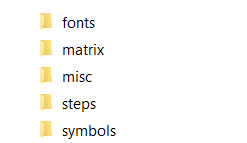
Note 22: An export that maybe available from the Altium Designer CAD system is the IPC-2581 cvg file format. The first few lines of the IPC-2581 .cvg file will look something like the sample below. You can import this file into the Unisoft software.
<?xml version = "1.0" encoding = "UTF-8"?>
<IPC-2581 xmlns="https://webstds.ipc.org/2581" xmlns:xsi="https://www.w3.org/2001/xmlSchema-instance" xmlns:xsd="https://www.w3.org/2001/xmlSchema">
<Content>
<FunctionMode mode="FULL" level="1"/>
<StepRef>PCB</StepRef>
<LayerRef>INT10</LayerRef>
<LayerRef>INT9</LayerRef>
Link to download a sample IPC-2581 .cvg file
Link to download a sample IPC-2581A
.xml file
History:
IPC-2581 (Initial Release -
2004)
IPC-2581A (Revision A - 2013) improvements over the
initial version, making the format more practical for real-world designs.
IPC-2581B (Revision B - 2017) further refined the standard with better support
for 3D data, material definitions, advanced assembly configurations, etc.
Note 23: CAD tool: This CAD tool exports drawing type files. For example some of the drawing file types that maybe created by this CAD tool are DXF, TIFF, JPG, BMP, HPGL, etc. These files are drawing type files and Unisoft can import and display these drawing files but they have little other value within the Unisoft software. For example you can not extract component, pin, x/y, netlist data, etc. from these type of files.
Note 24: The first few lines of the IPC-2581 .cvg file will look something like the sample below. You can import this file into the Unisoft software.
<?xml version = "1.0" encoding = "UTF-8"?>
<IPC-2581 xmlns="http:" xmlns:xsi="https://www.z.com" xmlns:xsd="https://www.z.com">
<Content>
<FunctionMode mode="FULL" level="1"/>
<StepRef>test-3_r2</StepRef>
<LayerRef>TOP</LayerRef>
<LayerRef>GND</LayerRef>
<LayerRef>IS1</LayerRef>
Link to download a sample IPC-2581
.cvg file
Link to download a sample IPC-2581A
.xml file
History:
IPC-2581 (Initial Release -
2004)
IPC-2581A (Revision A - 2013) improvements over the
initial version, making the format more practical for real-world designs.
IPC-2581B (Revision B - 2017) further refined the standard with better support
for 3D data, material definitions, advanced assembly configurations, etc.
Note 25: The first few lines of the IPC-2581A .xml file will look something like the sample below. You can import this file into the Unisoft software.
<?xml version = "1.0" encoding = "UTF-8"?>
<IPC-2581 revision="A" xmlns="https://" xmlns:xsi="https://www.zzz.com" xmlns:xsd="https://www.zzz.com">
<Content roleRef="">
<FunctionMode mode="FULL" level="1"/>
<StepRef name="test-3_r2"/>
<LayerRef name="TOP"/>
<LayerRef name="GND"/>
<LayerRef name="IS1"/>
Link to download a sample IPC-2581A .xml file
Link to download a sample IPC-2581
.cvg file
History:
IPC-2581 (Initial Release -
2004)
IPC-2581A (Revision A - 2013) improvements over the
initial version, making the format more practical for real-world designs.
IPC-2581B (Revision B - 2017) further refined the standard with better support
for 3D data, material definitions, advanced assembly configurations, etc.
Note 26: The first few lines of the Fabmaster FATF file will look something like the sample below. You can import this file into the Unisoft software.
; ???????? FATF OUTPUT FILE FABmaster(R) 06-Jan-2017 13:15
:FABMASTER FATF REV 11.2;
:UNITS = 1/100000 INCH;
:BOARD_DATA
1,JOB("CIM",,03-06-2017,03-06-2017);
:EOD
:NOTRACE
:PARTS
1,"C1","391777-06-8","391777-06-8",-480000,25000,2700,T;
2,"C10","391777-06-8","391777-06-8",-512500,65000,900,B;
3,"C11","391777-06-8","391777-06-8",-577500,7500,2700,B;
Note 27: For the DesignSpark CAD system to generate an ODB++ file go to the main menu and click OUTPUT and then click ODB++. After the ODB++ file has been created go to Note: 6.
Note 28: An export that maybe available from the OrCAD PCB assemblyDesigner system is the IPC-2581 .cvg file format. The first few lines of the IPC-2581 .cvg file will look something like the sample below. You can import this file into the Unisoft software.
<?xml version = "1.0" encoding = "UTF-8"?>
<IPC-2581 xmlns="https://webstds.ipc.org/2581" xmlns:xsi="https://www.w3.org/2001/xmlSchema-instance" xmlns:xsd="https://www.w3.org/2001/xmlSchema">
<Content>
<FunctionMode mode="FULL" level="1"/>
<StepRef>PCB</StepRef>
<LayerRef>INT10</LayerRef>
<LayerRef>INT9</LayerRef>
Note 29: Mentor Graphics Neutral File:
Exporting from the CAD System: From the CAD system on the output menu of the Fablink utility select WRITE NEUTRAL FILE and then select to output all options. You can now import this file into the Unisoft software.
Note 30: OrCAD export of GenCAD:
Exporting from the CAD System: In the OrCAD layout software without a board or project open from the File menu select Export and choose the GenCAD option. You can now import this file into the Unisoft software.
Note 31: X-Y Component center and rotation file: An X Y Center and rotation (XYR) file is any file containing component X Y center and rotation information. This type of file in most any format can be imported into the Unisoft software and is useful in creating Assembly and AOI machine programs.
In AutoCAD Electrical an X Y Center and rotation (XYR) file maybe exportable via the Data Extract window. They can then use that file to import into the Unisoft software.
Below are examples of files that contain reference designator, X/Y center and rotation in various formats. All of these file types and also a similar one exported from AutoCAD Electrical via the Data Extract window can be imported into the Unisoft software.
Example 1:
391727-10-9 R19 -5.375 -0.950 180.0
391728-10-9 R20 -5.500 -1.225 270.0

Example 2:
R25 0805 1Kohm -4.750 -1.225 0.0
R26 0805 20Kohm -5.750 -1.245 0.0

Example 3:
C1 10nF RLP133 125.00 m 525.00 m 180 TOP
C2 10nF RLP133 1325.00 m 525.00 m 180 TOP

Example 4:
R18 1730 115 270 r0805
R20 1190 125 0 r0805

Example 5:
R219 RES0805 5720mil 1410mil 5720mil 1410mil 5686.535mil 1410mil T 360.00 10.0K
R138 RES0805 5720mil 1330mil 5720mil 1330mil 5686.535mil 1330mil T 360.00 10.0K
Please note that it is always preferable to use the other full CAD files listed above and not a XYR file as your first choice for importing into the Unisoft software.
For more details on XYR importing click here FEATURES and see "Importing your X/Y Center, Rotation files".
Note 32: ODB++ export from EASY-PC:
Exporting ODB++ from EASY-PC: Go to the Output menu to export the ODB++ file. In the window displayed for Layers click the box Select All and at the top of the window click the box Compressed . A compressed .TGZ file will be created in the folder location selected in the Compressed File field.
Note 33: ODB++ export from Pulsonix:
Exporting ODB++ from Pulsonix: Exporting ODB++ from Pulsonix: Go to the Output menu to export the ODB++ file. In the window check the box Compressed. Leave the box Use CAM/Plot Layer Combinations unchecked. A compressed .TGZ file will be created in the folder location selected.
Note 34: X-Y Component center and rotation file from the FreePCB CAD system: An X Y Center and rotation (XYR) file is any file containing component X Y center and rotation information. This type of file in most any format can be imported into the Unisoft software and is useful in creating Assembly and AOI machine programs.
For details on how to export a X-Y Component center and rotation file from the FreePCB CAD system go to https://FreePCB.dev/pnp.html.
Please note that it is always preferable to use the other full CAD files listed above and not a XYR file as your first choice for importing into the Unisoft software.
Click here for more details on importing your X/Y center, rotation files.
Please double check that your email address is correct.
Email addresses are kept private.
The software download link, more information and periodic updates will be sent to this address.
Optionally to receive your software call us (enable JavaScript for our phone number).

Unisoft: Manufacturing software since 1985