

- Software Products
- Trial Software
- CAD Translation
- Testimonials
- Overview
- Pricing
- Knowledge Base
- Contact Us -
- Languages
There are two methods for translating the
language on this website, as outlined below.
First method:
Select one of the following language links, or
go to the Languages page:
中文 (Chinese)
Unisoft Chinese
日本語
(Japanese)
Unisoft Japanese
한국어
(Korean)
Unisoft Korean
Deutsch (German)
Unisoft German
English Unisoft
English
Second method:
The Unisoft web pages on this website, including the software product manuals, are available in approximately 100 languages when using the Google Chrome browser.
When browsing the Unisoft website with Google Chrome, it will normally detect your native language based on your keyboard settings and automatically switch to that language. The web pages, user manuals, Help tooltips, and other information on this website should then display in your native language by default.
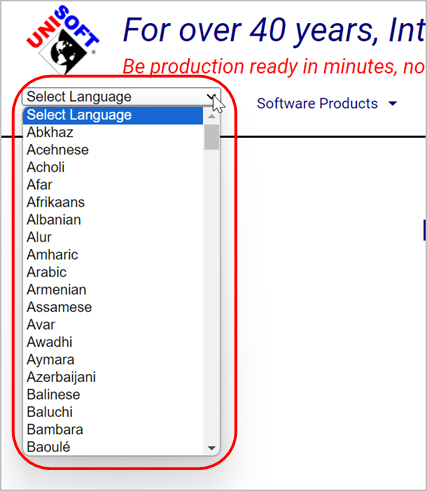
If you need to select a language manually, go to any page on this Unisoft
website. At the top of the page, click the Language drop-down menu and
select your language.
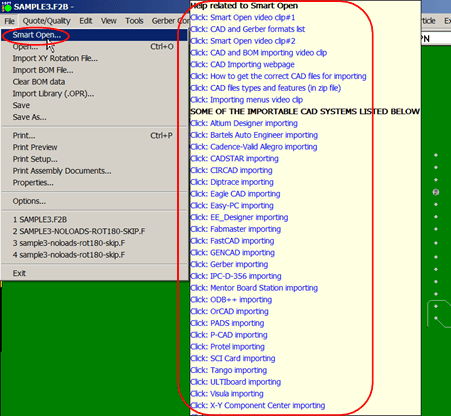
HELP tooltips are available for most menu items. Hover
over a menu item for one or two seconds, and an additional menu will appear. You
can then click any of the videos, user manuals, or website links. Normally, when
using Google Chrome, the Unisoft website will automatically display this
information in your native language.
User manuals: Select one of the
user manuals below. Normally, when using Google Chrome, the Unisoft website
will automatically display the manual in your native language.